
Open source, AGPL-3.0, self hosted
The self hosted music metadata editor for your whole library
Scan your music folders, then browse, filter, play and edit tags for MP3, FLAC, M4A and Opus from any browser. Runs in Docker. Your files never leave your server.
demo / demo, read only
docker run -d -p 3000:3000 -v /path/to/music:/music ghcr.io/suitux/tagr:latest
- AGPL-3.0
- amd64 and arm64
- No telemetry
- SQLite, no external database
- Works on mobile
Why run a self hosted music metadata editor
Your music, your server.
No cloud, no accounts, no uploads. Tagr writes tags straight to the files on your NAS.
Built for big libraries.
Virtual scrolling and SQLite indexing take tens of thousands of tracks without flinching.
Edit from anywhere.
A browser is the only requirement. No Wine, no VNC, no desktop tag editor.
A web based music tag editor that does the whole job
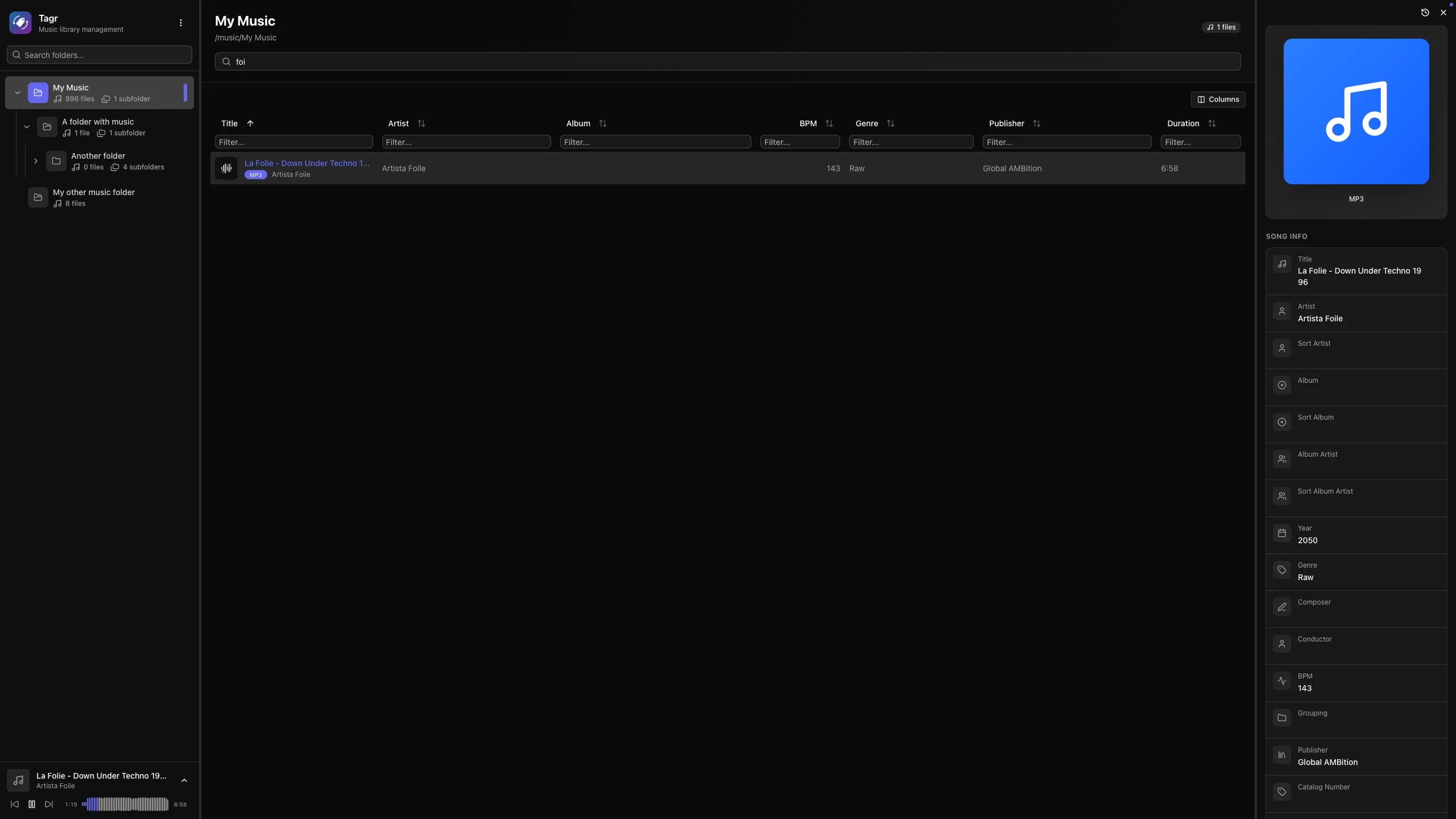
Edit 40+ metadata fields inline.
Title, artist, album, year, genre, composer, BPM, lyrics, sort fields, catalog numbers, barcodes. Add your own custom tags beyond the standard set. Manage album art: view, replace, upload. Star ratings from 1 to 5. Codec, bitrate, sample rate, channels and bit depth shown read only.
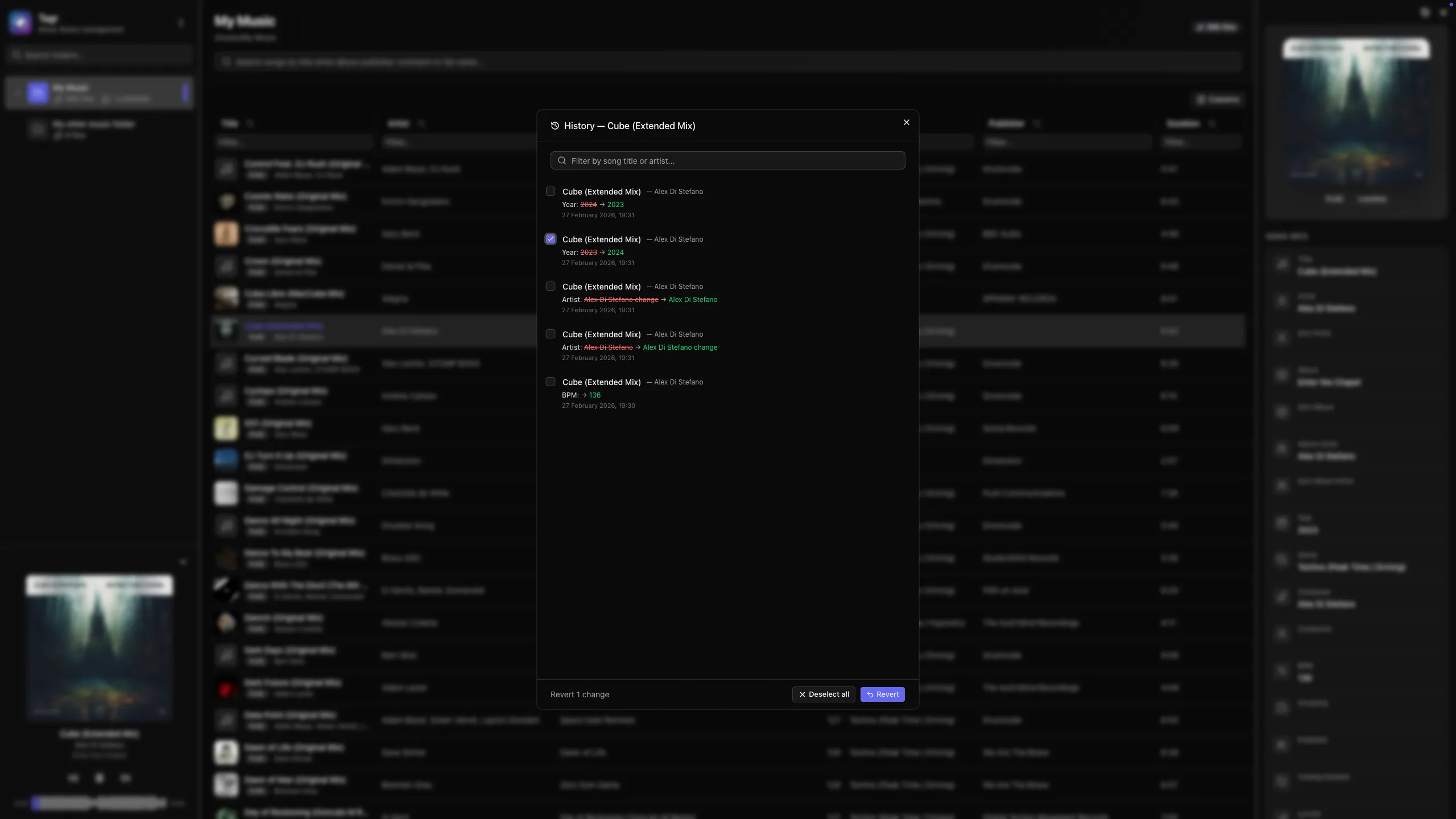
Full change history with one click revert.
Every change is recorded with its old and new value. Revert one edit, or shift and ctrl select to undo dozens at once. History views per song and per folder.
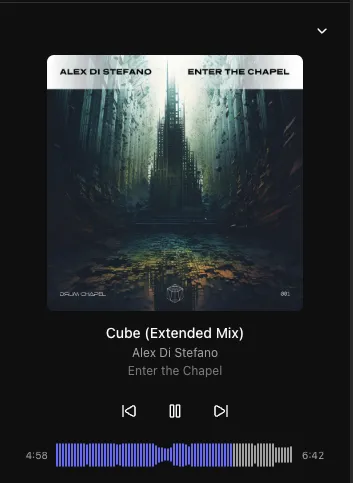
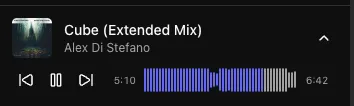
Built in player with waveform.
A WaveSurfer.js waveform with click to seek, play and pause, previous and next, auto advance. A collapsible sidebar player with album art. Hear the track you are tagging without leaving the page.
Browse a library of any size.
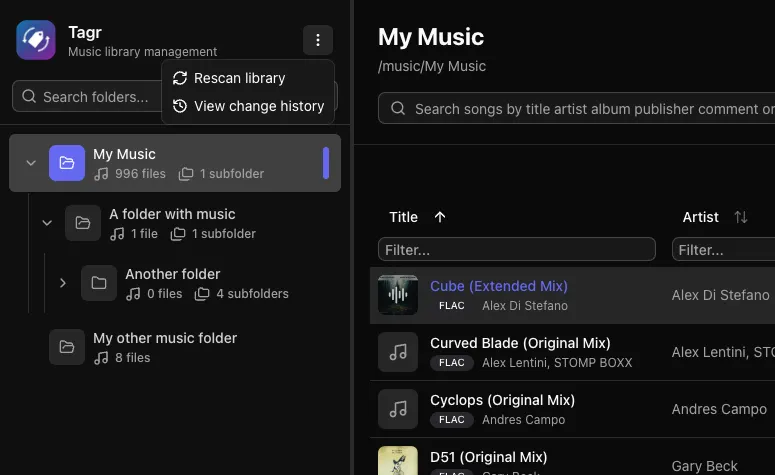
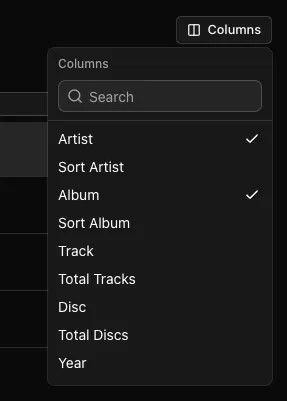
Three resizable panels: folder tree, song list, detail editor. Sort on any column. Filter by text, numeric range, date range or boolean. Show or hide any of 40+ columns. Virtual scrolling and infinite pagination.
Share the library, not the password.
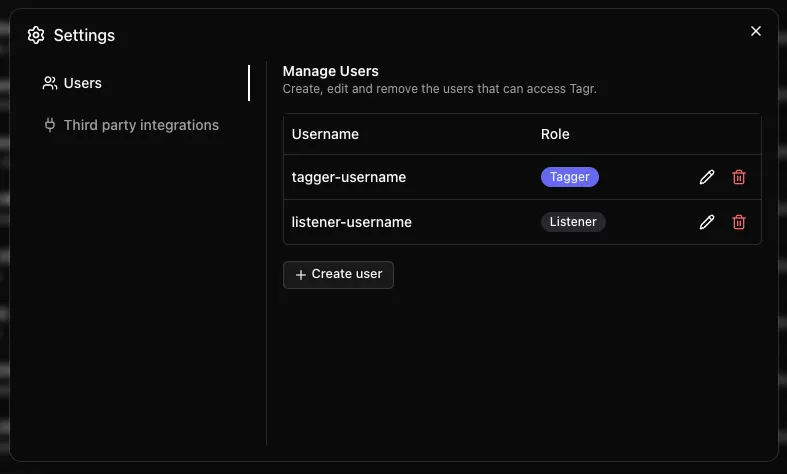
Give everyone their own account. The admin comes from your environment file, the rest are created inside Tagr with a role: a Tagger browses, plays, edits metadata and rescans, a Listener only browses and plays. The interface hides what a role cannot do and the API enforces it on every request. Listen history and play counts are kept per user.
Scrobble to ListenBrainz.
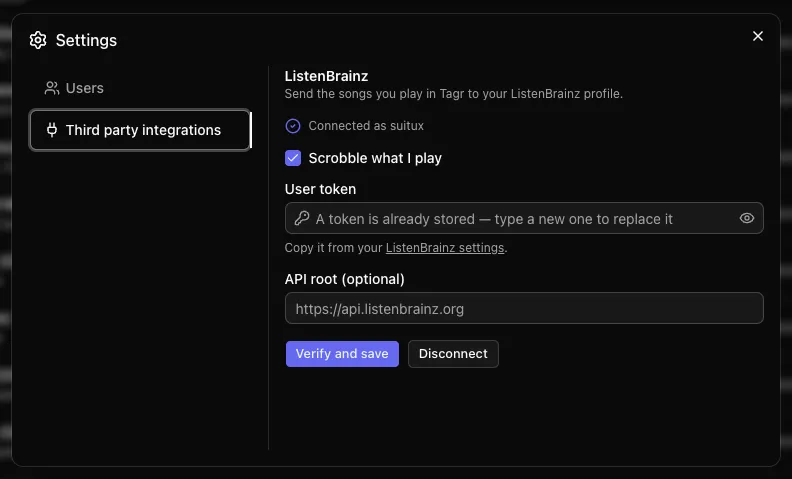
Paste your ListenBrainz token once and every play is forwarded to your profile, plus a playing now update while the track runs. Each user connects their own account, tokens are encrypted before they reach the database, and listens are queued and retried if ListenBrainz is unreachable. Point it at your own compatible server if you self host that too.
MusicBrainz lookup
Match songs against MusicBrainz and pick exactly which fields to apply.
Bulk editing
Select many songs, apply the same field changes or covers in one pass, confirm, review the summary.
Mobile first responsive UI
Full screen panels with swipe gestures, an expanded player, always visible edit actions. Installable as a PWA.
Custom playlists
Group songs outside the folder structure.
Lossless detection
FLAC, WAV, AIFF and friends get an automatic Lossless badge.
URL based state
Folder, song, sort and filters all live in the URL. Bookmark or share any view.
Users and roles
Password protected access with user management built in: admin, tagger and listener.
Dark by default
Because you are going to be in here for a while.
Supported audio formats: MP3, FLAC, M4A, Opus and more
- MP3
- FLAC Lossless
- WAV Lossless
- AAC
- OGG
- M4A
- M4B
- WMA
- AIFF Lossless
- Opus
Tagr reads and writes tags with node-taglib-sharp and extracts metadata with music-metadata, the same libraries desktop tag editors rely on. Lossless formats are detected automatically.
See Tagr running
Tagr vs other music tag editors
Most tag editors are desktop apps you have to run on the same machine as your files. Tagr runs where your music already lives.
| Capability | Tagr | MusicBrainz Picard | Mp3tag | beets | MetadataRemote |
|---|---|---|---|---|---|
| Runs in the browser, self hosted | Yes | No, desktop app | No, desktop app | No, CLI | Yes |
| Works on mobile | Yes, swipe gestures and PWA install | No | No | No | Responsive, not mobile specific |
| Docker, multi arch | amd64, arm64 | n/a | Windows first | Yes | amd64, arm64, armv7 |
| Manual tag editing UI | Yes, 40+ fields | Yes | Yes, very deep | No, CLI and config | Yes, all fields plus custom fields |
| Custom metadata fields | Yes | Yes | Yes | Yes | Yes |
| Bulk editing | Yes, multi select with summary | Yes | Yes | Yes | Yes, per file or whole folder |
| MusicBrainz lookup | Yes | Yes, best in class | Via plugin | Yes | Yes, with confidence scoring |
| Undo and revert | Persistent audit trail in SQLite, survives restarts, per song and per folder | No | No | No | Undo and redo up to 1,000 operations, in memory, cleared on container restart |
| Built in player | Yes, waveform with click to seek | Basic preview | No | No | Yes, in browser streaming |
| Album art management | Yes: view, replace, upload, bulk apply | Yes | Yes | Via plugin | Yes |
| Sortable, filterable table with 40+ columns | Yes | No | Yes | n/a | No |
| Advanced filters: text, numeric, date, boolean | Yes | No | Partial | Via queries | Search filter only |
| Authentication and multi user | Yes, built in | n/a | n/a | n/a | None, LAN only, needs a reverse proxy |
| Shareable, bookmarkable URL state | Yes | No | No | No | No |
| Formats | MP3, FLAC, WAV, AAC, OGG, M4A, M4B, WMA, AIFF, Opus | Broad | Broad | Broad | MP3, FLAC, OGG, Opus, M4A, M4B, WMA, WAV, WavPack |
| License | AGPL-3.0 | GPL-2.0 | Freeware, closed | MIT | AGPL-3.0 |
Picard and beets shine at automated, fingerprint driven library organization, and Mp3tag is the deepest manual editor on Windows. All three want to run on the machine your files sit on. Tagr keeps your library where it already lives and hands you a browser: a sortable, filterable view of every track, a persistent audit trail of every change you can revert, built in auth, and a UI that actually works on a phone.
More on how Tagr differs, in the FAQInstall Tagr with Docker
Three commands and a volume mount. The compose file below is the one from the repository.
-
Generate an auth secret
Run openssl rand -hex 32 and paste the output into AUTH_SECRET.
-
Bring the container up
Run docker compose up -d in the folder holding your compose file.
-
Open it and scan
Go to http://localhost:3000, log in, and hit scan to index your library.
services:
  tagr:
    image: ghcr.io/suitux/tagr:latest
    container_name: tagr
    restart: unless-stopped
    ports:
      - "3000:3000"
    environment:
      - PUID=1000
      - PGID=1000
      - NODE_ENV=production
      - DATABASE_URL=file:/data/tagr.db
      - AUTH_SECRET=paste-your-generated-secret-here
      - AUTH_USER=admin
      - AUTH_PASSWORD=your-password-here
      - AUTH_URL=https://your-domain.com
    volumes:
      - sqlite_data:/data
      - /path/to/your/music:/music

volumes:
sqlite_data:docker run -d \
--name tagr \
-p 3000:3000 \
-e PUID=1000 \
-e PGID=1000 \
-e DATABASE_URL=file:/data/tagr.db \
-e AUTH_SECRET=paste-your-generated-secret-here \
-e AUTH_USER=admin \
-e AUTH_PASSWORD=your-password-here \
-v tagr_data:/data \
-v /path/to/your/music:/music \
ghcr.io/suitux/tagr:latestgit clone https://github.com/suitux/Tagr.git
cd Tagr
pnpm install
pnpm build && pnpm startFrequently asked questions
What is a music metadata editor, and why self host one?
A music metadata editor reads and writes the tags stored inside your audio files: title, artist, album, year, genre, cover art and dozens more. Those tags are what Jellyfin, Navidrome and Plex read to build your library, so bad tags mean a broken library. Self hosting the editor means the files stay on your server and you fix them from a browser instead of copying terabytes to a laptop.
Does Tagr modify my original audio files?
Yes, and that is the point. Tagr writes tags into the actual files on disk using node-taglib-sharp, so any other player sees the change. The audio stream itself is never re-encoded. Every write is recorded in the change history with the old and new value, so you can revert it.
Which audio formats does Tagr support?
MP3, FLAC, WAV, AAC, OGG, M4A, M4B, WMA, AIFF and Opus. Lossless formats are detected automatically and carry a Lossless badge in the song list.
Can I run Tagr on a Synology, Unraid or Raspberry Pi?
Yes. The image on GHCR is multi-arch and covers linux/amd64 and linux/arm64, so it runs on x86 NAS boxes, Apple silicon and a Raspberry Pi 4 or 5 on a 64 bit OS. Mount your music share into the container at /music and set PUID and PGID to the user that owns the files.
How large a music library can Tagr handle?
Tens of thousands of tracks. Metadata is indexed into SQLite on scan, the song list uses virtual scrolling with infinite pagination, and filters and sorts run against the database rather than in the browser. The first scan is the slow part, since every file has to be read once.
Is Tagr free and open source?
Yes, under AGPL-3.0-only. The source is on GitHub, there is no paid tier and no license key. If it saves you an afternoon of tagging, you can buy the author a coffee.
Does Tagr send any data to the cloud?
No telemetry, no analytics, no phoning home. The one outbound call Tagr can make is to the MusicBrainz API, and only when you explicitly ask it to look a song up. Skip that feature and the container never talks to the internet.
Can I use Tagr from my phone?
Yes. The UI is responsive and mobile first: full screen panels with swipe gestures between the folder tree, song list and editor, an expanded player, and edit actions that are always visible rather than hidden behind hover. It installs as a PWA from the browser.
How is Tagr different from MusicBrainz Picard or Mp3tag?
Picard and Mp3tag are desktop applications that need to run on the machine holding your files, which for most self hosters is a headless server. Tagr runs on that server and gives you a browser UI instead. It also keeps a persistent audit trail of every edit and works on a phone, which neither of them does.
Can multiple people use the same Tagr instance?
Yes. Tagr has password protected access and user management built in, so you can create an account for each person who shares the library, with a role that decides what they can do: taggers edit metadata and rescan, listeners only browse and play. Access is per user, not a single shared password.
Can I undo a metadata change?
Yes. Every change is stored in SQLite with its old and new value, and the audit trail survives container restarts. Revert a single edit from the song history, or shift and ctrl select a range and revert dozens at once. There are history views per song and per folder.
Do I need to expose Tagr to the internet?
No. Most people run it on the LAN and reach it at http://server:3000. If you do want it reachable from outside, put it behind a reverse proxy with TLS and set AUTH_URL to the public URL so sessions and redirects resolve correctly.
Take back control of your music tags
Free and open source. Runs on your hardware. AGPL-3.0.